
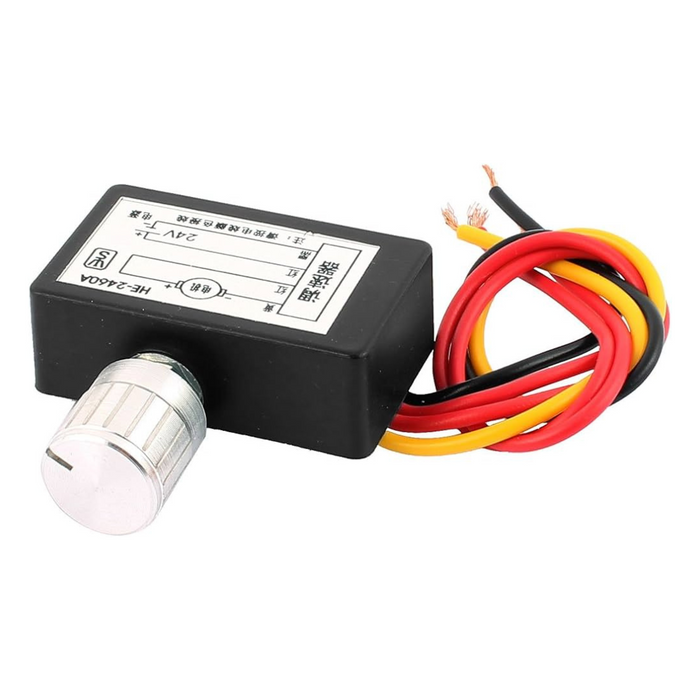
Electronic Fan and Circulation Regulator
Description
Fan Speed Controller Advanced Airflow Control for DTF Systems
In the complex world of Direct-to-Film (DTF) printing, managing heat and air is just as important as managing ink. The Fan Speed Controller is a sophisticated control module designed to optimize the performance of cooling fans and vacuum systems. It acts as the "brain" of your printer’s ventilation, ensuring that every fan spins at the precise speed required for the task. Whether you are drying film, stabilizing the vacuum bed, or cooling down a curing oven, this regulator provides the consistency needed for high-quality production.
Effective circulation prevents ink from "bleeding" and ensures that the PET film remains perfectly flat during the printing process. By automating air management, this regulator reduces waste and increases the lifespan of your mechanical components.
Maximize your production efficiency by pairing your new ink system with the right media. High-quality films ensure better ink adhesion and sharper details for every project. Visit our
Ink quality is just as important as tank design for high-quality prints. Our specially formulated inks minimize clogging and maximize color accuracy. Explore our
Why Airflow Control is Critical for DTF Success Fan Speed Controller
Many operators underestimate the importance of air circulation. However, air is the medium that controls temperature and media stability. The Electronic Fan and Circulation Regulator addresses three primary challenges in a professional print shop.
1. Vacuum Bed Stability
For a printhead to deliver ink accurately, the film must be perfectly flat. The regulator manages the vacuum fans under the printing bed. It ensures the suction is strong enough to hold the film but gentle enough to allow it to slide smoothly. Without precise regulation, the film may buckle or lift, causing catastrophic head strikes.
2. Controlled Ink Drying
As ink is deposited onto the film, the surrounding air must be circulated to begin the drying process without causing a "skin" to form too quickly. The regulator adjusts the circulation fans to provide a steady, laminar flow of air. This prevents humidity from building up around the printhead, which can lead to nozzle clogging.
3. Thermal Management
DTF printers generate significant heat, especially near the carriage motors and the pre-heating plates. The Electronic Fan and Circulation Regulator monitors these zones. It ramps up fan speeds when temperatures rise and slows them down when the machine is idle. This "smart" cooling prevents overheating while saving energy and reducing noise.
Key Technical Features of the Fan Speed Controller
Our Electronic Fan and Circulation Regulator is built with industrial-grade components to survive the demanding environment of a 24/7 print shop.
Precision PWM Control
Unlike simple on/off switches, this regulator uses Pulse Width Modulation (PWM). This allows for infinite speed adjustments. You can fine-tune your fan speeds from 1% to 100% with absolute precision. This level of control is essential when switching between different film thicknesses or ink densities.
Real-Time Monitoring and Feedback
The module features a digital interface that provides real-time data on fan RPM and voltage. If a fan becomes obstructed or fails, the regulator can trigger an alarm or pause the print job. This prevents the machine from running "blind," protecting your hardware from heat damage.
Low-Noise Operation
By optimizing the fan speed to match the heat load, the regulator significantly reduces ambient noise. In a small workshop, this makes a massive difference in the comfort of the operators. It eliminates the constant "drone" of fans running at maximum speed when it isn't necessary.
Universal Compatibility
The regulator is designed to work with standard 12V and 24V DC fans. It features plug-and-play connectors that integrate easily with most DTF control boards. Whether you are using it for a shaker-dryer unit or the main printer body, installation is simple and fast.
Installation and Setup Strategy
To get the most out of your Electronic Fan and Circulation Regulator, follow these placement and configuration tips:
-
Centralized Location: Mount the regulator in a well-ventilated area of the printer's electronics cabinet. Ensure it is away from the high-voltage power supply to avoid electrical interference.
-
Sensor Placement: If your regulator supports thermal probes, place them near the "hottest" components, such as the motor drivers or the underside of the heating bed.
-
Balanced Airflow: Configure the regulator to create a balance between "intake" and "exhaust" fans. This ensures that fresh air is constantly moving through the machine rather than just swirling hot air around.
-
Regular Calibration: Check your settings every month. As fans age or collect dust, they may require slightly more voltage to maintain the same RPM.
Signs You Need a New Circulation Regulator
If your airflow system is failing, your prints will be the first to show the symptoms. Watch for these warning signs:
-
Film Buckling: If the vacuum feels inconsistent, the regulator may be failing to provide a steady voltage to the suction fans.
-
Excessive Noise: A failing regulator can cause fans to "pulse" or whine, indicating an unstable power delivery.
-
Ink Mist Build-up: If you notice an unusual amount of ink mist settling on the
Encoder Strip -
Overheating Errors: If the printer frequently pauses due to motor heat, the regulator is not responding quickly enough to temperature spikes.
Fan Speed Controller
| Feature | Specification |
| Input Voltage | 12V / 24V DC Auto-Sensing |
| Control Type | PWM (Pulse Width Modulation) |
| Max Current | 10A Total Across Channels |
| Display | High-Contrast Digital Readout |
| Protection | Short-Circuit and Over-Current Protection |
| Mounting | DIN Rail or Screw Mount |
Conclusion: Fan Speed Controller
The Fan Speed Controller is an essential upgrade for any serious DTF professional. It transforms your printer from a simple machine into a precision-controlled environment. By mastering your airflow, you protect your printhead, improve your film stability, and ensure that every print is a masterpiece.
You are invited to join the DTF Bank world to stay updated on the latest printing techniques and find inspiration for your creative projects. Follow us on Instagram, Facebook, and TikTok to catch professional tips, product reviews, and exclusive deals. You can also subscribe to our YouTube channel for hands-on tutorials. If you are looking for visual ideas for your next project, explore our Pinterest boards, or connect with us on LinkedIn for corporate updates. For any questions or support requests, feel free to reach out to us anytime at info@dtfbank.com.
Specifications
Warranty
Spare parts do not carry a warranty, and no warranty coverage is provided after installation or use.
All spare parts are non-returnable and non-refundable. It is the customer's responsibility to verify and ensure the compatibility of any spare part with their equipment before placing an order. Spare parts offered by DTF Bank are specifically designed for and intended to be used with our equipment, and compatibility with third-party or modified machines cannot be guaranteed. Please review our Return & Refund Policy for complete details and additional information.
If a spare part arrives damaged or defective, do not open, install, or use the item. Please take clear photos of the outer packaging and, if the box shows signs of damage, record a video of the unboxing. Submit these materials through the Order Support Request Form on our website within 5 business days of receiving the item.
Please note that any spare part that has been opened, used, or installed is not eligible for return or replacement under any circumstances, even if it would otherwise qualify as damaged or defective.
Shipping
At DTF Bank, we use trusted carriers to ensure your spare parts are delivered safely and promptly, offering shipping methods such as ground or air.
Orders for spare parts placed before 2 PM Central Time (CT) are shipped the same business day to get your products to you as quickly as possible. Orders received after this time will be shipped the next business day.
Shipping costs will be calculated at checkout based on the location provided, the shipping option selected, and the total weight of the purchase.
Currently, DTF Bank does not offer international shipping and ships exclusively within the United States to focus on delivering the best possible service to our domestic customers.
DTF Bank is not responsible for any delays that occur after the package is handed over to the shipping company.
While we strive to meet all delivery times, there may be occasions due to unforeseen circumstances where deliveries could be delayed. We appreciate your understanding and patience in these instances.
For more details, check out our Shipping Policy.